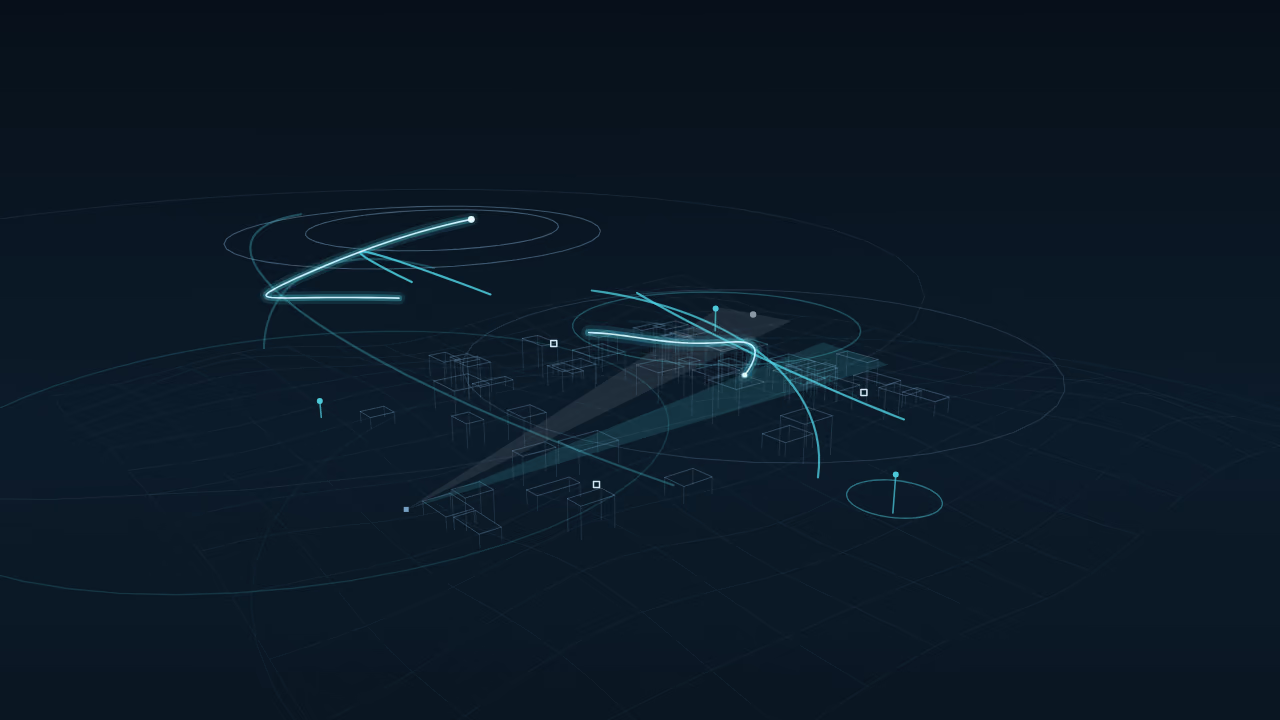
Data status: Synthetic demonstration
Pick any object. Every panel follows.
A synthetic demonstration of how the platform is designed to hold one object across RF, PCL and EO sources. The scenario is fixed and drawn for illustration; it shows no real place, sensor or result.
Panoramic EO/IR strip
Tags mark the objects the EO channel sees. Select a tag or a row.
Situation view
RF gives a direction only. PCL gives range ellipses. A wider ellipse means a wider confidence band.
Observation table
| Time | Track | Class | Sources | Confidence | Evidence | Freshness |
|---|---|---|---|---|---|---|
| 00:08 | Small drone 78% | RFEO | High | Corroborated | Fresh | |
| 00:16 | Aircraft 93% | PCLRF | High | Corroborated | Fresh | |
| 00:28 | Bird-like 54% | EO | Medium | Single source | Fresh | |
| 00:40 | Unknown | PCLEO | Low | Unresolved | Fresh | |
| 00:56 | Aircraft 81% | PCLEO | High | Corroborated | Fresh |
Selected object

T1 Small drone 78%
- Track
- T1 · Small drone 78%
- Sources
- RFEO
- Confidence band
- High
- Evidence
- Corroborated
- Known then
- 00:16
- Freshness
- Fresh
Sense
One airspace. Many signals.
Every family of sources sees part of the picture and none sees all of it. A source that reports nothing has not reported that the air is empty.
Six families of sources
Passive RF sensing
- Adds
- Notices objects that emit radio energy, without transmitting anything itself.
- Cannot prove alone
- Says nothing about an object that stays silent.
Passive coherent location
- Adds
- Reads existing broadcast signals as objects reflect them, to estimate range and motion.
- Cannot prove alone
- Cannot say what an object is, and depends on the broadcasts available.
Electro-optical and infrared
- Adds
- Gives a visual look that helps classify what another source found.
- Cannot prove alone
- Needs a line of sight and workable light or weather.
Cooperative and external aviation data
- Adds
- Brings in what aircraft and aviation services report about themselves.
- Cannot prove alone
- Misses anything that does not report, and a report can be wrong.
Atmospheric context
- Adds
- Explains why another source may be weaker at a given moment.
- Cannot prove alone
- Does not detect objects at all.
System telemetry
- Adds
- Tells the picture how healthy and how fresh each source is.
- Cannot prove alone
- Says nothing about the airspace itself.
Acoustic sensing belongs to the same family and is described in text only.
Unknown is not zero. When a source sends no report, the picture shows unknown, never clear.
- Source A
- Source B
- Source C
| Time (relative) | Source A | Source B | Source C |
|---|---|---|---|
| 1 | 10 | 6 | 0 |
| 2 | 12 | 8 | 0 |
| 3 | 13 | 10 | 2 |
| 4 | 12 | 12 | 4 |
| 5 | 11 | 13 | 7 |
| 6 | 10 | 13 | 10 |
| 7 | 9 | 14 | 13 |
| 8 | 10 | 13 | 16 |
Understand
From observation to understanding.
Eight stages carry a raw observation to a state a reviewer can check. Step through them, then move the time control to compare what was known then with what is known now.
Time 36 of 36: 40 observations arrived, 38 attached to the track, 2 unknown.
Legend
- Passive RF: direction only, distance unknown
- PCL: a coarser position, and later
- Electro-optical: a fine position, with gaps in haze
- Unknown: fits no track
- Track, as known then
- Confidence band
- Gate
- Known now: hindsight, labelled as such
- Sensor site (abstract)
Three sources report on their own clocks. Each has its own delay, noise and gaps.
Around each predicted position, a statistical gate marks which observations could belong to the track.
The nearest observation inside the gate is attached to the track. Nothing outside it is forced in.
A filter turns the attached observations into one smooth state: position and velocity.
The band around the track is its uncertainty. It widens when sources go quiet and narrows when they agree.
An observation that fits no track stays grey and unassigned. It is not promoted to a threat or thrown away as noise.
Move the time control back. The track shows only what had arrived by that moment.
Later data refine earlier positions. The dashed line is that corrected track, labelled as hindsight and never passed off as the original.
Two views of the same idea
| Stage | Value |
|---|---|
| 1 | Observations |
| 2 | Alignment |
| 3 | Candidate link |
| 4 | Supported state |
| 5 | Evidence kept |
- Confidence
- Uncertainty band
| Time (relative) | Confidence | Uncertainty band |
|---|---|---|
| 1 | 40 | 26 - 54 |
| 2 | 42 | 28 - 56 |
| 3 | 45 | 33 - 57 |
| 4 | 60 | 52 - 68 |
| 5 | 63 | 56 - 70 |
| 6 | 66 | 60 - 72 |
| 7 | 68 | 62 - 74 |
| 8 | 52 | 40 - 64 |
| 9 | 50 | 38 - 62 |
| 10 | 54 | 44 - 64 |
| 11 | 58 | 49 - 67 |
| 12 | 60 | 52 - 68 |
Remember
Live state. History. Context. Evidence.
The Airspace Digital Twin is designed to hold five layers of one picture together, so a reviewer can ask what is there, what was known, in what setting, how sure we are and on what evidence.
Layers of one picture
The unified state of each track, with its unknowns kept visible.
Every earlier state stays stored, so any moment can be reopened.
Terrain, weather and protected areas that change how a signal should be read.
How sure the system is, and which source quality drives it.
The method, record and limit behind each claim.
Data status: Illustrative
Step through a replay
Step 1 of 4Step 1
One intelligence layer. Multiple sources.
Four bands carry data from the first observation to the system that uses it. Open a band to see what it holds.
Four bands of the architecture
ObserveMany sources enter through adapters that record where each observation came from and how fresh it is.
- Source adapters
- Clock and freshness
- Source health
UnderstandObservations are correlated, fused and given a confidence that can be inspected.
- Correlation
- Multi-sensor fusion
- Classification in context
PreserveState, history and evidence are kept together, so any past moment can be reviewed.
- Unified state
- History and replay
- Provenance chain
DeliverGoverned interfaces hand the picture to the systems that need it, with its limits attached.
- Role-based views
- Interfaces that state what is unknown
- Audit trail
| Stage | Value |
|---|---|
| 1 | Sources |
| 2 | Model |
| 3 | Policy |
| 4 | Interface |
| 5 | Consumer |
| 6 | Audit |
Protect
Built for real environments.
Six kinds of environment, with the protected ones first. Each panel says what AIR NEXUS is designed to add and where that stops.
Six environments
Critical infrastructure
- What it is designed to add
- A reviewable picture of the airspace around sites that must keep running.
- Where it stops
- A description of the intended contribution. No site result is claimed.
Low-altitude airspace
- What it is designed to add
- Awareness of low-altitude airspace, brought together from several modest sources.
- Where it stops
- Low-altitude detection depends on terrain, clutter and the sources available. Nothing is promised without them.
Airports and aviation
- What it is designed to add
- A shared picture of aircraft, UAS, wildlife and weather around active operations.
- Where it stops
- It supports human review. It does not replace air traffic control or any certified system.
Ports and coastal areas
- What it is designed to add
- Awareness over harbours and shorelines, where low flight, weather and traffic meet.
- Where it stops
- Coastal conditions change what each source can see. The panel claims no coverage.
City and regional airspace
- What it is designed to add
- One picture across many sites, built up from local ones.
- Where it stops
- Scale adds sources and gaps together, and the picture states both.
Wildlife and aviation safety
- What it is designed to add
- Context on birds and animals near the runway, for the people who manage that risk.
- Where it stops
- A planning aid. It predicts no strike and removes no risk.
Critical infrastructure
- What it is designed to add
- A reviewable picture of the airspace around sites that must keep running.
- Where it stops
- A description of the intended contribution. No site result is claimed.
Low-altitude airspace
- What it is designed to add
- Awareness of low-altitude airspace, brought together from several modest sources.
- Where it stops
- Low-altitude detection depends on terrain, clutter and the sources available. Nothing is promised without them.
Airports and aviation
- What it is designed to add
- A shared picture of aircraft, UAS, wildlife and weather around active operations.
- Where it stops
- It supports human review. It does not replace air traffic control or any certified system.
Ports and coastal areas
- What it is designed to add
- Awareness over harbours and shorelines, where low flight, weather and traffic meet.
- Where it stops
- Coastal conditions change what each source can see. The panel claims no coverage.
City and regional airspace
- What it is designed to add
- One picture across many sites, built up from local ones.
- Where it stops
- Scale adds sources and gaps together, and the picture states both.
Wildlife and aviation safety
- What it is designed to add
- Context on birds and animals near the runway, for the people who manage that risk.
- Where it stops
- A planning aid. It predicts no strike and removes no risk.
Data status: Illustrative Abstract marks for illustration, not coverage
Fifteen projects. One architecture.
The portfolio is grouped into five families. Choose a family to see how its projects connect to the core platform and which evidence level each one has reached.
The platform that holds the picture together: the core, the fusion engine and the data interface.
Projects in this family
- Airspace Intelligence Core Platform
E1Architecture Defined - Multi-Sensor Fusion Engine
E0Concept - Airspace Data & Intelligence API
E0Concept
All fifteen projects by family
Core Intelligence
The platform that holds the picture together: the core, the fusion engine and the data interface.
- Airspace Intelligence Core Platform
E1Architecture Defined - Multi-Sensor Fusion Engine
E0Concept - Airspace Data & Intelligence API
E0Concept
Sensing & Perception
The ways the architecture observes: passive RF, passive coherent location, electro-optical sensing and the distributed network.
- Distributed Passive Radar Network
E0Concept - Passive RF Sensing Node
E1Architecture Defined - Passive Coherent Location (PCL) Radar
E1Architecture Defined - Electro-Optical AI Detection & Classification
E0Concept
Protected Environments
Where the architecture is applied first: critical infrastructure, drone intrusion and airports.
- Critical Infrastructure Airspace Protection
E0Concept - Drone Detection & Airspace Intrusion Intelligence
E0Concept - Airport Airspace Intelligence
E0Concept
Domain & Environmental
Specialist views of the surroundings: birds and wildlife, ports and coasts, and the local atmosphere.
- Bird & Wildlife Radar Intelligence
E0Concept - Port & Coastal Air-Surface Intelligence
E0Concept - Hyperlocal Atmospheric Intelligence
E0Concept
Networked Airspace
Scale across places: city and regional low-altitude networks, and the near-ground network.
- Near-Ground Airspace Intelligence Network
E0Concept - City / Regional Low-Altitude Airspace Network
E0Concept
Data status: Illustrative An abstract map for illustration, not a system layout
Verify
Built on evidence.
Each project states the evidence level it has actually reached, and the levels above it are shown as not yet demonstrated.
The evidence ladder
- E0 · ConceptAn idea and a stated purpose, with nothing yet built to test it.Reached
- E1 · Architecture DefinedA written architecture that others can review.Reached
- E2 · Prototype ValidatedA working prototype checked against stated criteria.Not yet demonstrated
- E3 · Integrated ValidationSeveral parts checked together as one system.Not yet demonstrated
- E4 · Controlled Field ValidationChecked in the field, under controlled conditions.Not yet demonstrated
- E5 · Qualified / OperationalQualified, and operating under independent review.Not yet demonstrated

A higher visual finish does not imply a higher evidence level.
Real hardware looks convincing in a photograph. It tells you nothing about what has been demonstrated.
How a claim is kept honest
- Claims written to the level
- Limits stated beside results
- Data status on every chart
- Unknown never shown as clear
Launch register
P01P02P03P04P05P06P07P08P09P10P11P12P13P14P15
Projects P01 to P03: architecture defined
Projects P04 to P15: concept
| Stage | Value |
|---|---|
| E0 Concept | Reached |
| E1 Architecture Defined | Reached |
| E2 Prototype Validated | Not yet reached |
| E3 Integrated Validation | Not yet reached |
| E4 Controlled Field Validation | Not yet reached |
| E5 Qualified / Operational | Not yet reached |
From site to region.
The architecture is designed to grow one stage at a time, from a single facility to a region, without changing how evidence is stated.
Five stages of scale
Facility
One site, with its own sources and its own local picture.
Campus
Several sources around one campus share a single picture.
Multi-site
Separate sites exchange what they know, and each keeps its own record.
City or corridor
Sites along a city or a corridor are read as one connected area.
Region
Many areas are brought together, and the gaps between them are shown as unknown.
Data status: Illustrative An abstract sequence for illustration, not a deployed network
Two views of scale
| Stage | Value |
|---|---|
| Site | 8 |
| Local | 5 |
| District | 3 |
| Region | 1 |
- Normal
- Degraded
- Unavailable
| Time (relative) | Component 1 | Component 2 | Component 3 |
|---|---|---|---|
| 1 | Normal | Normal | Normal |
| 2 | Normal | Normal | Normal |
| 3 | Normal | Normal | Normal |
| 4 | Normal | Normal | Unavailable |
| 5 | Normal | Normal | Unavailable |
| 6 | Normal | Degraded | Normal |
| 7 | Normal | Degraded | Normal |
| 8 | Degraded | Normal | Normal |
| 9 | Degraded | Normal | Degraded |
| 10 | Normal | Normal | Normal |
| 11 | Normal | Normal | Normal |
| 12 | Normal | Normal | Normal |
Decide
Intelligence where your systems need it.
A governed interface is designed to hand the picture to other systems, with its time, its sources and what is still unknown attached to every object.
Fields of one object
observed_at- When the observation was made, not when it arrived.
sources- Which families of sources contributed.
position- Where the object was, with its stated uncertainty.
confidence- How far the picture can be trusted, kept apart from the evidence level.
state- Known or unknown. Unknown is never sent as clear.
provenance- A reference to the chain of steps that produced it.
{
  "object": "example-object",
  "observed_at": "example-time",
  "sources": [
    "passive_rf",
    "pcl"
  ],
  "position": {
    "value": "illustrative",
    "uncertainty": "stated"
  },
  "confidence": "stated",
  "state": "unknown",
  "provenance": "ref:example-chain"
}
A fictional object with invented values, shown to explain the fields. It comes from no real system.
How delivery stays governed
| Item | Updates |
|---|---|
| Under 1 min | 62 |
| 1 to 5 min | 28 |
| Over 5 min | 10 |
Improve
Engineering the next layer of airspace understanding.
Short notes on method and limits. Each one says what it does not establish.
Latest notes
Unknown Is Not Zero: Reading Airspace Without False Reassurance
Why an empty display must never be read as an empty sky, and how a state can say what it does not know.
Known Then, Known Now: Why a Replay Must Not Rewrite the Past
A replay is useful only if it shows what was known at the time, not what we learned afterwards.
Passive Radar as One Layer Among Many
Passive coherent location earns its place by joining other sources, not by standing alone.
Discuss your airspace environment.
Tell us about the place, the question and the systems around it. We will answer where the architecture applies and where it does not.
Start with a topic
Please keep sensitive operational details out of your first message. We will agree a suitable channel first.
We say what is known, and we say what is not yet.